Can I create demand?
Nobody opens Instagram to buy a heat pump. They open it to see their cousin's holiday, and somewhere between the third and fourth post they see your ad. You are paying to interrupt someone who was not looking and can scroll past in a third of a second.
Someone typing "emergency plumber" into Google has already decided, and a plumber gets a cheaper enquiry there than any Meta targeting can match. Meta's jobs are the ones search cannot do: a new product, a category nobody searches for by name, a service people think about once every five years. If people already search for what you sell, meet them on Google first.
How an ad finds someone
What you control
The creative, the budget, the objective, and roughly who: a country, an age range, sometimes an interest.
What Meta controls
Exactly who sees it, when, and on which placement.
On Meta the creative is the targeting. At launch the algorithm does not know who your customer is. It shows the ad to a spread of people, watches who stops and who acts, and narrows towards more like them. An ad built around a tradesperson's ute finds tradespeople; the same offer on a kitchen bench finds homeowners. Change the picture and the audience moves further than any targeting setting will move it.
“We initially thought Meta was just a B2C play - but business leaders also use Facebook & Instagram and the performance surprised us”
Clearly co-founder, Founder at Colab Cohorts
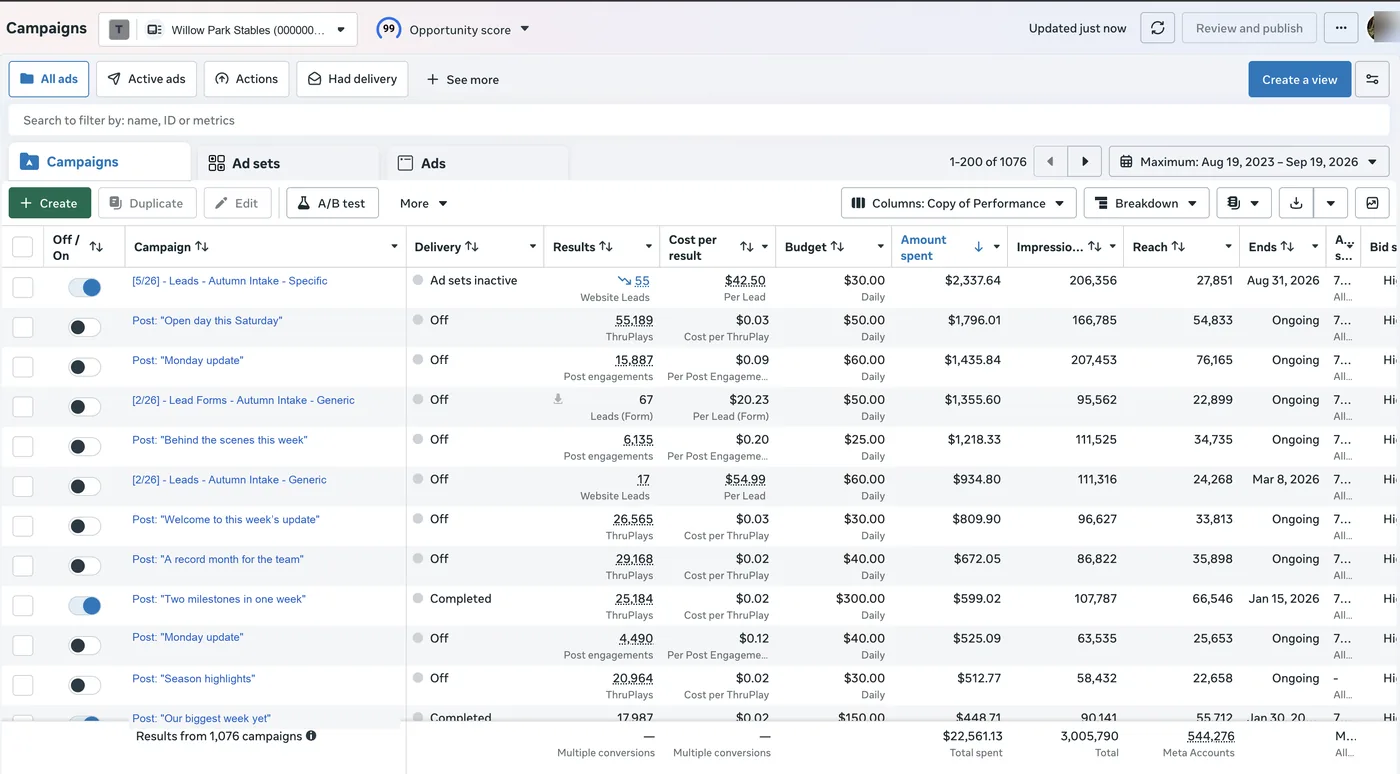
Four Metrics of Efficiency
Meta Ads metrics explained takes each one apart.
CPM
The price of a thousand impressions. It moves with competition, season and how Meta rates your creative.
At an $18 CPM, a $1,200 month buys roughly 67,000 impressions.Ads Manager · Performance columnsCTR
Clicks divided by impressions. It judges the picture, headline and offer together, before your website gets involved.
Frequency
Impressions divided by reach. The earliest warning that a creative is wearing out.
A frequency of 2.4 over a month is comfortable. The same figure over a week is not.Ads Manager · Delivery columnsCost per result
Spend divided by results, where the result is whichever outcome your objective named.
$40 per quote request, against what a job is worth.Ads Manager · Results columnWhen cost per result climbs, the other three say why: being seen costs more, fewer people click, or the same people have seen it too often. Raising the budget fixes none of them, and makes the last one worse.
Setting it up
The first two are the ones people skip and regret.
Account Set-up
15 min
- Set up a business portfolio under your own login.
- Create the ad account inside it.
- Add your agency as a partner, so the account and its history stay yours.
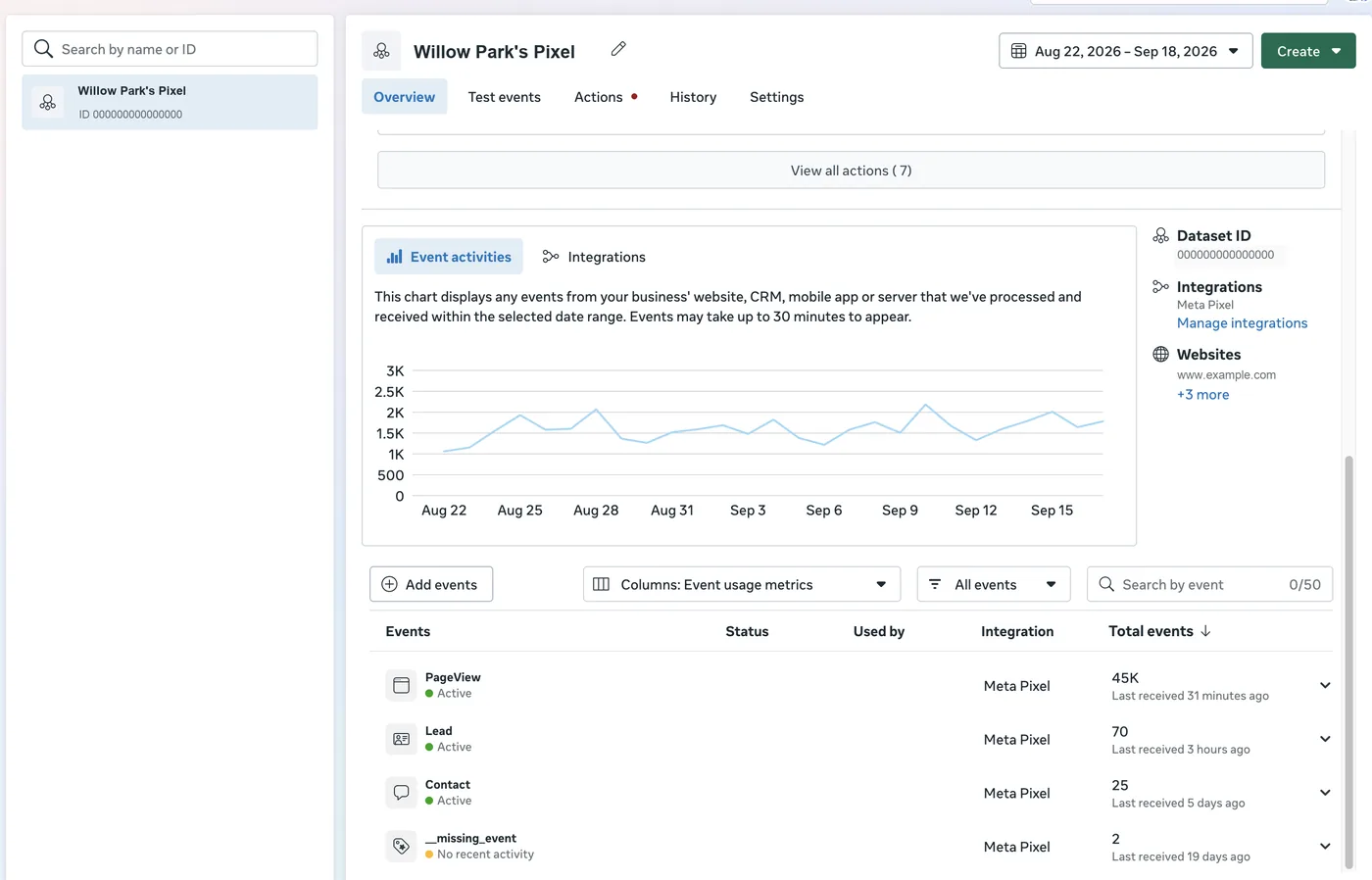
Pixel and Conversions API
20 min
- Install the Meta Pixel on your website.
- Connect the Conversions API to send the same events from your server.
- Check Events Manager shows your lead or purchase event arriving.
Campaign Objective
5 min
- Choose Leads, or Sales if you sell online.
- Skip Traffic: it buys cheap clicks from people who leave.
Creative Testing
30 min
- Build one campaign with two or three creatives.
- Make each a different idea: a customer video, a product still, a plain offer card.
- Skip colour variations of one idea; they test only the colours.
Monthly Budget
5 min
- Budget $600 to $1,000 a month: enough for 15 to 25 results at $40 each.
- Leave the campaign alone for a week before you change anything.
Three things beginners misread
The wrong read
"Meta claims 48 leads, Analytics shows 19. Meta is making it up."
The right read
"Meta counts people who saw the ad and later bought. Analytics credits whatever sent the final visit. Both are counting honestly, and neither is the whole picture."
Meta and Analytics will never agree
Meta counts a conversion when someone who saw an ad converts inside its attribution window, including people who never clicked. Google Analytics credits the last channel that sent the visit, so someone who saw a Meta ad on Tuesday and typed your name into Google on Friday is a Meta lead to Meta and an organic visit to Analytics.
Meta will report more, always. Make decisions on one number, your own orders or enquiries, and read platform figures as direction.
The wrong read
"Frequency is up to 4.1 and clicks are down. The audience is too small, so let's raise the budget."
The right read
"The same people have now seen this ad four times and stopped noticing it. A new creative resets it; a bigger budget just shows the tired one more often."
Rising frequency with falling CTR is fatigue
Everyone in the pool who was going to respond has responded, and Meta re-serves them because it has nothing fresher. CPM rises alongside: reaching the same people again costs more.
More budget accelerates this. The fix is a new creative, and our Creative Loop is the whole method: how many concepts to run, when to refresh, and how to keep a queue so the replacement is ready before the numbers demand it.
The wrong read
"It is not working yet, so I paused it on Thursday, changed the audience, and turned it back on."
The right read
"That restarted the learning phase. The four days of data Meta had already paid to collect are gone, and the next four will be spent collecting them again."
Fiddling resets the learning
A new or edited ad set enters the learning phase, where costs run high and erratic. Significant edits (budget, audience, objective, creative) restart it, as does pausing a campaign for seven days or more. A short pause does not.
Leave a new campaign alone for a week, or until it has enough results to judge. Edit every few days and you pay for the most expensive phase for ever.
In Clearly
Sign in with the Facebook account that runs your ads and pick the ad account. The report opens on spend, impressions, clicks and results against the previous period, broken down by objective, platform and campaign, with lead campaigns down to ad set and ad.
Top ads shows each ad as it ran, image or video, with its spend and cost per result. Creative fatigue reads frequency, click-through and CPM together on each creative: any one moving has an innocent explanation, all three together is the diagnosis, and it names the tired creative while there is time to line up the next.
Meta metric cheat sheet
| Metric | What it is | How it is counted |
|---|---|---|
| Impressions | How many times your ad was shown | Every appearance counts; one person can generate many |
| Reach | How many separate people saw it | Each person counted once per period |
| Frequency | Average times each person saw it | Impressions divided by reach, for the period |
| Clicks | Taps on your ad | Link clicks go to your website; all clicks include likes and expands |
| CTR | Click-through rate | Clicks divided by impressions, as a %, never an average of daily rates |
| CPM | Cost per thousand impressions | Spend divided by impressions, times one thousand |
| Cost per result | What one outcome cost you | Spend divided by results (whatever your objective named) |
| ROAS | Return on ad spend | Revenue divided by spend, from summed totals, not averaged campaign figures |
Common questions
How much do I need to spend to test Meta properly?
Enough for 15 to 25 results a month, the volume the algorithm needs before it stops guessing. Work backwards from your target cost per result: at $40 a lead that is $600 to $1,000 a month, for two or three months before you judge anything. Spending $200 for three weeks gives you noise that looks like an answer.
Why does Meta report more conversions than Google Analytics?
They count different things. Meta credits an ad when someone who saw it converts within its attribution window, including people who never clicked. Analytics credits the last channel that sent the visit, so someone who saw your ad on Tuesday and searched for you on Friday is a Meta lead in Ads Manager and an organic visit in Analytics. Neither is lying. Pick one source for decisions, usually your own orders, and read the rest as direction.
Do I need a Facebook page to run Instagram ads?
For a campaign in Ads Manager, plan on it: the ads run under a Facebook page identity, and linking the Instagram account to that page is part of setup. Boosting from inside the Instagram app can work with an Instagram professional account alone, but that is a boost, not a campaign. Run the page anyway. It is free, it is the first thing a curious buyer checks, and its numbers have their own guide: Facebook and Instagram Pages for Beginners.
How often should I change my creative?
When the numbers say so, not on a calendar. Rising frequency with falling click-through, usually alongside a rising CPM, is the signal, and it arrives sooner for a small audience. Keep the next concept ready before you need it, which is what the Creative Loop is for.
Should I boost a post or build a campaign?
Boost for reach on something already doing well organically, and expect engagement, not sales. Build a campaign in Ads Manager for any business outcome, because the objective, placements and conversion tracking live there. A boost optimises for people who will react to a post, not people who will buy.
Where to go next
Pixel and Conversions API before the first dollar. Then one budget, two or three properly different creatives, and a week of leaving it alone.
All nine Platform 101s, in setup order
